
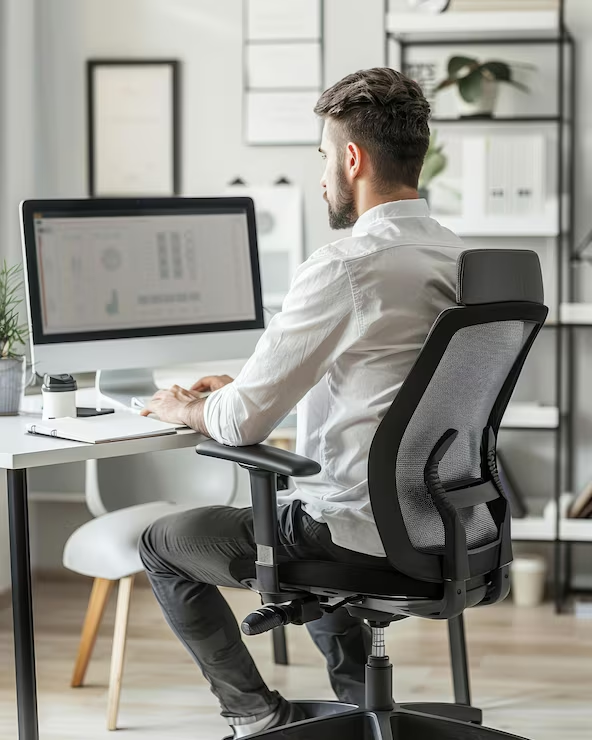
After a long day sitting at my computer, I could feel it. My body was drained. My back ached, my eyes felt strained, and don’t even get me started on my stiff neck.
What was happening?
After months of pain, I had enough and started a journey to discover healthier habits to help for working in an office setting. This journey brought me to Ergonomics.
Ergonomics is the science of designing and arranging your workspace, tools and daily tasks to fit your body’s natural capabilities. When an office space is set up ergonomically it can greatly reduce strain, prevent injury and boost efficiency. Sign me up!
So how does it work? I’ve uncovered 5 ways to help have a more comfortable, and forgiving, workspace.
- Your Chair is Your Foundation
My lower back and hips hurt the most after long days at my desk. After paying closer attention, I realized my chair—not my workload—was the biggest culprit.
Learn from my mistake and be aware of the settings on your desk chair. These are typically found via levers or knobs under the seat of your chair. Some chairs provide height adjustments, reclining options and even lumbar support. Depending on your chair, take some time to explore the options available to you for the most comfortable seat.
You will want to feel supported, but still comfortable. Adjusting chair height so that your legs are neutral and not high or swinging is key. Ensure that you are not reclined too far back, but your chair is also not forcing you forward closer to your screen. It should provide you with a neutral spine provided by proper lumbar and spinal alignment.
Chair height can also have an impact on your shoulders. If your arms do not clear the desk at the right height, you may find your arms scrunched up, which leads to tension in your arms and shoulders. We are humans, not T.rexes, so ensure your height is adjusted so that your elbows are equal with the desktop at a 90-degree angle, and your wrists rest comfortably in front of your keyboard.
Once you find the right settings on your chair, then begin to focus on the way you sit in that chair.
- Improve Your Posture
I was a big fan of crossing my legs under my desk to provide a comfortable seating position. But in my ergonomics journey I realized, I’m purposefully twisting myself up like a pretzel, causing unnecessary strain on different muscle groups.
It was challenging to reteach my body to sit with my feet flat on the floor, but the results were noticeable. My hips lost their strain and I still felt comfortable in my seat.
So remember to keep those feet flat on the floor, knees at a 90-degree angle and avoid twisting or crossing whenever possible while sitting for long periods of time.
Arms and shoulders benefit from being in a rested position and should not be overextended to reach the keyboard or mouse.
By keeping your feet planted, maintaining proper alignment, and positioning your arms comfortably, you can reduce unnecessary strain and create a workspace that supports your body instead of working against it.
- Position Your Monitor for Comfort
Whether you are using a laptop, double monitors, or maybe you have a set up of even more screens, try this exercise. Take a look at the center of your screen and take notice of what your head is doing.
Are you looking up? Down? Is your neck twisted to the right or left in a noticeable way?
These may be signs that your monitors are not set at the correct height or layout.
The top of your monitors should align with the top of your head. This significantly reduces the head movement up and down and makes for more restful posture.
If extra height is needed, you may consider purchasing a monitor stand, or go simple and use a pile of books or objects around the house to boost that monitor up.
Bring monitors together so that there is not a large gap and this will help reduce neck strain in the long run from having to look right and left.
- Prevent Eye Strain
Along with your monitor height, you may also want to consider adjusting your monitor brightness. High brightness can lead to strain on your eyes, so ensure that your screen brightness is at an agreeable level where it’s not too bright, but also not too dark.
Digital screens can contribute to eye fatigue, especially after hours of uninterrupted use. While some people find blue-light-filtering glasses more comfortable, research hasn’t consistently shown that they reduce digital eye strain. The most effective strategies are adjusting screen brightness, reducing glare, and taking regular breaks.
Breaks for your eyes can take many forms. You can follow the 20-20-20 rule. Every 20 minutes, look at something about 20 feet away for 20 seconds.
Or, stand up from your desk and walk away for a few minutes. Don’t worry, the work will still be there when you’re back.Your eyes will thank you for the opportunity to have a break from screen time.
This leads us to the final tip.
- Take Movement Breaks
You’ve probably heard the expression “motion is lotion” and your work environment is no exception. Research shows that prolonged sitting increases muscle fatigue, even when posture is good.
Make sure to stand up and move around. This could be some light stretching, taking a walk during lunch or even a walk to the breakroom to fill up your water bottle will do the trick. Every bit helps to loosen your muscles and joints.
So what have we learned?
Ergonomic Workspace Checklist
- ✓Adjust your chair appropriately
- ✓ Keep feet flat on the floor
- ✓ Knees at 90°
- ✓ Elbows level with the desk
- ✓ Monitor at eye level
- ✓ Screen brightness adjusted
- ✓ Follow the 20-20-20 rule
- ✓ Take movement breaks
Ergonomics isn’t about buying expensive office equipment or creating the perfect workspace overnight. It’s about making small adjustments that add up over time. Whether you start by raising your monitor, adjusting your chair, or simply taking more movement breaks, your body will likely notice the difference. After all, you spend thousands of hours at your desk each year—it’s worth making those hours as comfortable and healthy as possible.
Comments are closed